On AI at work
Implementing AI isn’t the goal. Using AI to create outcomes is.
Buying licences and running training feels like the finish line. It’s the start. Here’s a simple framework I came up with for getting from there to real outcomes, with what I’d do at each stage and a one-page plan to start with.
A lot of AI programmes end the same way. The licences are bought, people are trained, and the report says it’s done.
That’s the end of a project, but it isn’t a result. MIT NANDA’s 2025 study found that about 5% of AI pilots achieved rapid revenue gains.1 A 2026 survey by WRITER, an AI vendor, found only 29% of organisations see significant ROI from generative AI, and that individual wins aren’t turning into business value.2
I don’t think the tools are the problem. What’s usually missing is everything around them: knowing what you want more of, finding the right work to change, setting it up, and checking whether anything actually changed.
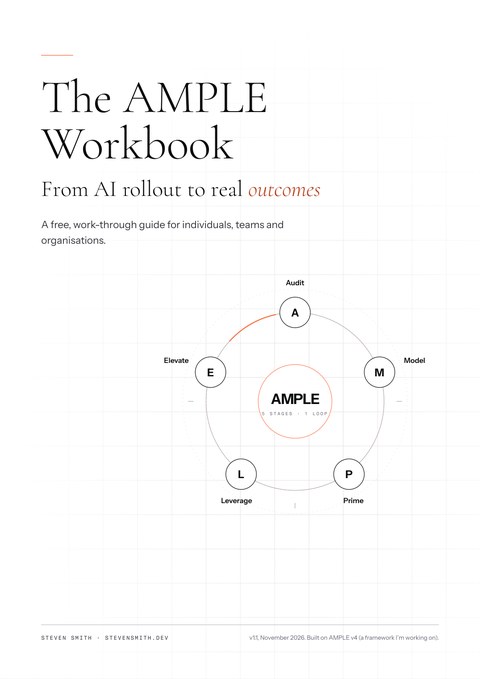
AMPLE is a framework I’m working on. I came up with it from looking at how I and others approach AI, and seeing where people struggle. It’s one practical way for individuals, teams and organisations to implement AI that delivers outcomes, improving both the work and the business. It has five stages, and the last one feeds back into the first, so it keeps running.
It’s for anyone who has started using AI and wants results, not just rollout: on your own work, with your team, or across an organisation.
Here’s each stage, what I’d do, and what you should have at the end of it.
Audit: set the goal, then see how the work really happens
Start with the goal: what do you want more of, and less of? Not “automate task X”, but “spend more time on marketing”, “turn proposals round faster”, or “do work I couldn’t do before”.
Then pick one workflow, your own or your team’s, not the whole company. One task is fine as a start. Map how it happens today, not how the process document says it does. If it’s a team’s workflow, sit with the people who do the work.
- Write down one to three goals: what you want more of, what you want less of, and how you’d know it’s working.
- Pick one workflow or task that takes real time, your own or your team’s, like a monthly report or preparing a proposal.
- List every step in it, who does it, and roughly how long it takes.
- Note where AI is already being used, including tools people use on their own.
- Mark where time goes on low-value work: copying, chasing, reformatting, re-checking.
WhoYou, on your own work, or the team lead with the people doing the work.At the endOne to three goals, and a task list showing where effort goes.
Model: decide how much AI each task gets
This is the step most people get stuck on: what should AI actually do? So it’s worth slowing down here.
Start from the goal you set in Audit, not the tool. Ask: which tasks stand in the way of it?
For my own work, I ask it a different way: how could I get rid of this task, so I can focus on something that matters more? Sometimes the answer is AI. Sometimes the task shouldn’t exist at all.
Do it task by task. A whole job or team is too big a unit. Someone will say “design should stay human”, and they’re right about the direction. But inside design there are tasks they’d happily hand off, like gathering references or making variations.
Each task gets one of four answers:
- Stop it.
- Some work has no real purpose. A meeting where someone reads numbers off a spreadsheet can just stop. No AI needed.
- Keep it human.
- The work that really needs a person. AI stays out. Clearing the rest makes room for more of it.
- Augment it.
- You and AI together, with you in control. A first draft, a second pair of eyes, a faster version of what you already do.
- Automate it.
- Work that’s needed but repetitive. AI does it and you check it. The person gets that time back.
The first answer is the one people skip, because the brief says “use AI”. It’s often the cheapest win you’ll get.
But AI isn’t only about taking work away. The bigger change is what people can now do that they couldn’t before. A product manager who can build a working app. Someone who can make slides that actually land, tell a story with data, or design a clear screen to show it. So there’s one more answer:
- Add it.
- Something new you couldn’t do before, that would change the result. A prototype instead of a description, a chart instead of a table, a designed page instead of a plain report.
It isn’t all or nothing either. Across my tasks it’s roughly 10% human, 30% augmented and 60% automated. That’s a rough starting guide, never a target. Before I hand anything over, I ask three things: why should AI do it, is the risk worth handing off, and should a person stay in control?
Then decide where the freed time goes. People often say automation will free up time for more valuable work, but what I usually see is people doing more of the same tasks. The mix of human, augmented and automated changes with every task. What matters is pointing the time you get back at your goal. On an agentic product design and development project, for example, it frees up far more time for strategy, design exploration and ideas.
To find the tasks, these questions help:
- What do I do every week that I put off?
- What do I copy, retype or reformat from one place to another?
- What do I write from scratch that follows the same shape every time?
- What do I check by hand that a simple rule could check?
- What do I wait on, when the information already exists somewhere?
- What would I do more of if I had the time?
- What do I skip, or wait on someone else for, because I don’t have the skill? Code, design, data, writing.
- Where would a working prototype, a better visual or a clearer story change the outcome?
“What would I do more of” tells you what to keep human, and where to point the freed time. The last two tell you what to add. The rest tell you what to stop, augment or automate.
- Do it for your own work first, then with your team if you’re running it as one.
- Fill in the task finder below for one workflow.
- Pick one to three tasks to change first: frequent, time-consuming, and low risk if AI gets it wrong.
- Pick one thing to add: a skill AI would let you use straight away on real work.
- For each, write the outcome you want in one sentence, and today’s number. Name an owner for each. It can be you.
- Decide who checks what AI produces. It can be you.
- Point the freed time at your goal.
WhoYou decide, or the team lead decides with the team.At the endA short list of changes, each with an answer, an outcome, a starting number and an owner.
The task finder
One row per task. Fill it in for one workflow, alone or with your team. Then pick the one to three rows to start with, and one thing to add. Nothing you type leaves this page, and it isn’t saved: copy it before you leave.
| Task | How often, how long | What’s it for? | Stop, human, augmented or automated? | Why, and what’s the risk? | If this was taken care of, I could focus on… |
|---|---|---|---|---|---|
| Something I can’t do yet | Where it would change the result | First small version I’ll make |
|---|---|---|
On a phone, swipe the tables sideways to see every column.
Prime: work out what you need, then set it up
Then work out what the tasks you chose need, and set up only that. Not everyone, all at once. I ask five questions:
- What tools do I need? Licences first for whoever does the chosen work, which may just be you.
- What data or systems do I connect? Only what the chosen tasks use.
- What context does the AI need? Who you are, how you write, what good looks like, so its work fits your work and your company. Keep it in files the tools can read, so nobody has to repeat it in every prompt.
- What never goes in without approval? Client data, personal data, anything confidential.
- What check does each task need, and who does it? What has to be true before the output is used. That can be you.
This part matters. But it’s only the start. Having the setup doesn’t mean anyone uses it on work that counts.
WhoYou, or whoever owns the tools and data, plus someone who checks AI output.At the endTools, connections, context, rules and checks for the chosen tasks.
Leverage: turn the change into value
This is where the change turns into value: the freed time and new abilities go into the goal. It’s also the part I’ve seen work, and it starts with training.
I ran an AI workshop for 200 people. Each session took about three hours, and anyone could also work through the worksheet at their own pace. Everyone built an app with AI.
The app wasn’t really the point. The workshop didn’t just explain how to do it. It offered use cases and examples to help people start thinking about how to actually apply it, and it covered mindset and ways of thinking. That’s what moved people from “I can build an app” to “here’s an idea from my own work worth building”.
Everyone ended up with a finished app of some sort. Then it went further than I’d planned. Some people used what they’d learnt to build internal business tools. Others started making prototypes for client proposals.

The moment that stuck with me was a product manager who had never written code. He built a working prototype to show his vision for a product at the proposal stage. In the past that was unheard of.
A proposal described the idea.Now it could show the idea working.
- Put the freed time and new skills into your goal: the proposal, the marketing, the prototype, the work you couldn’t do before.
- Practise on the tasks and the new skill you chose in Model, with real work, not features.
- Finish something that runs, and if it’s a team, make sure everyone does. Once you’ve done it yourself, you look at your own work differently.
- Spend as long on where to use it as on how. Examples close to your own work do more than any feature tour.
- Give the skill somewhere to pay off straight away. For us, that was proposals.
- Set a weekly rhythm: a short check-in, with yourself or your team, on what you made, where the freed time actually went, and what value it added.
The UK government’s 2026 review of AI upskilling case studies points the same way: training works when it’s tightly linked to real tasks and outcomes.3
WhoYour own weekly check-in, or the team lead runs one.At the endFreed time and new skills going into the goal every week, and a record of what it added.
Elevate: measure against your goals, then go round again
This is where I’d do it differently next time. I didn’t track outcomes. Managers tracked how many people went through the workshop and built an app. That’s worth knowing, but it counts attendance, not value. It’s also why I can’t say how many proposals included a prototype.
What I’d track, starting with the goals from Audit:
- Your goals
- Did you get more of what you wanted, and less of what you didn’t?
- Cycle time
- How long the work takes now compared with before, for example from brief to first proposal.
- Rework
- How often things come back to be fixed.
- Use
- Whether people still use the tool or workflow a month later.
- Where the time went
- Compared with what you wrote down in Model.
- Wins or revenue
- Where you can honestly link them.
Hours saved is the easy number, and the weakest. Saved time only counts once it turns into something.
- Four weeks in, check the goals from Audit first, then the numbers you wrote down in Model.
- For each change, decide: grow it, fix it, or drop it.
- Pick the next goal or tasks and start again at Audit, with what you’ve learnt.
WhoYou, or the team lead with whoever owns the numbers.At the endEvidence of what changed against the goal, and the list for the next round.
What to do on Monday
- Write down what you want more of, and less of.
- Pick one workflow: your own or your team’s.
- List the tasks in it. If it’s a team’s workflow, sit with two people who do the work.
- Mark each task: stop, human, augmented or automated. Stop one thing this week.
- Pick one thing you couldn’t do before, like a prototype, a chart or a designed page, and make a first version with AI.
- Choose one to three tasks to change, and write down today’s number for each.
- Set up what you need for those tasks, and practise on that real work, not a demo.
- Put a check-in in the calendar four weeks out.
The one-page AMPLE plan
The five stages on one page. Fill it in here and copy it into your own doc. It isn’t saved, so copy it before you leave.
Free AMPLE workbook
Work through it on your own, with your team, or across your organisation.
- Before you start, and choose your path
- 1Audit: set the goal, then see how the work really happens
- 2Model: decide how much AI each task gets
- 3Prime: work out what you need, then set it up
- 4Leverage: turn the change into value
- 5Elevate: measure against your goals, then go round again
- 6Your one-page AMPLE plan
- Worked example 1: on your own, every sheet filled in
- Worked example 2: a team
Sources
- 1MIT report: 95% of generative AI pilots at companies are failing. Fortune, August 2025, on MIT NANDA’s The GenAI Divide: State of AI in Business 2025.
- 2Enterprise AI adoption in 2026. WRITER with Workplace Intelligence; 1,200 employees and 1,200 executives. A vendor survey.
- 3Supporting case studies: What works for AI upskilling in the UK. Department for Work and Pensions and Skills England, 27 July 2026.